
HubSpot implementation
HubSpot, implemented with the RevOps plumbing that makes the data trustworthy.
aibrevo implements HubSpot across Sales, Marketing and Service Hubs — pipeline design, lifecycle stages, required properties, workflows and custom-object modelling — so the CRM reflects your process and the reports are believable. Most HubSpot projects run 3 weeks to 3 months.
Who this is for
Marketing and RevOps teams at SMB and mid-market companies rolling out HubSpot, migrating to it, or fixing a rollout where the data is a mess.
What we implement in HubSpot
Pipeline & lifecycle
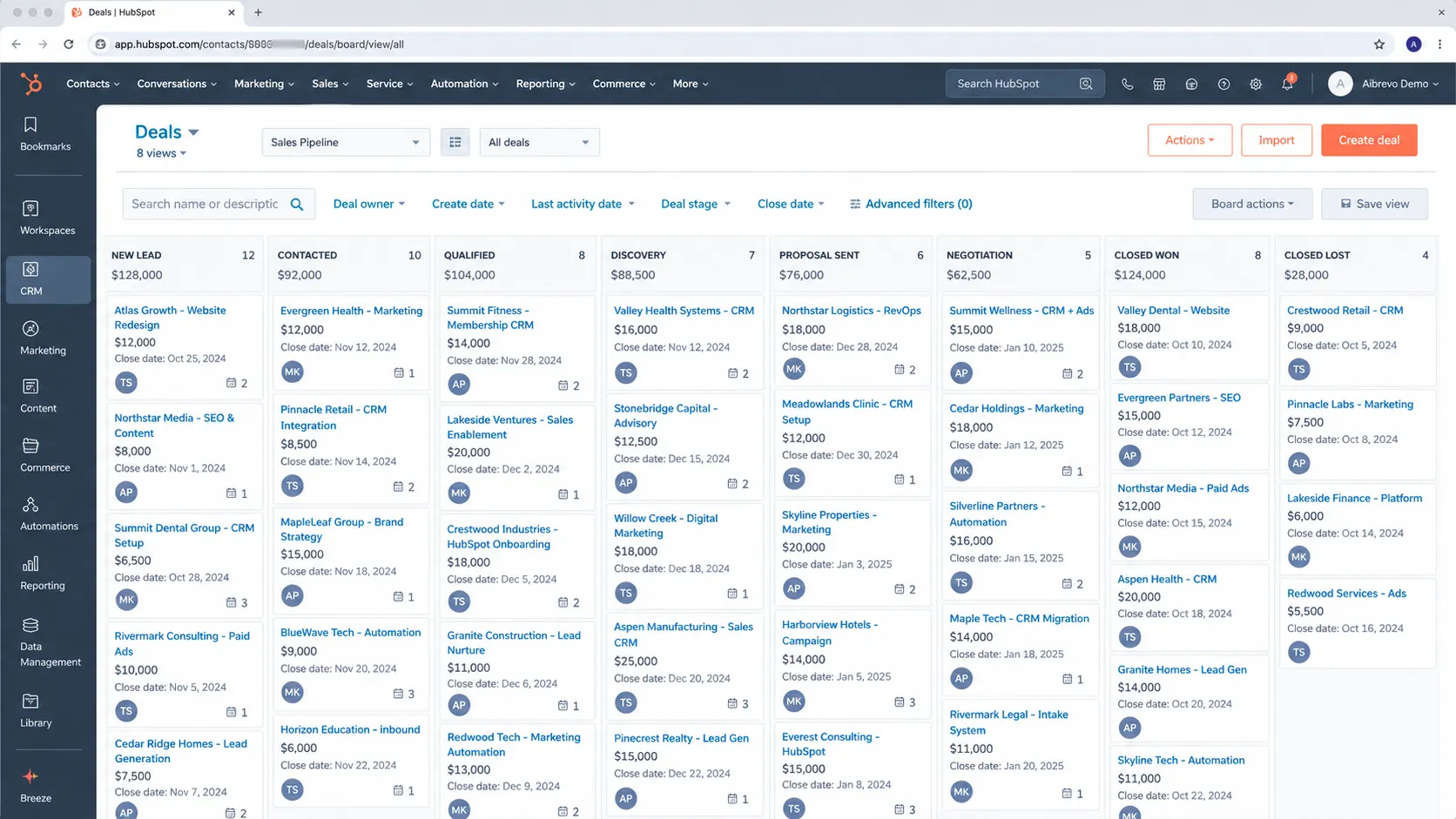
Deal stages, lifecycle stages and lead-status definitions that match how deals actually move — with marketing and sales agreeing on what each lifecycle stage means before it's built, not after the reports disagree.
Properties & data model
Required fields, custom objects and property logic that keep records clean at the source, so a dashboard built six months from now is reading data that was validated on the way in, not patched together after the fact.
Workflows
Lead routing, rotation, enrichment, task automation and internal notifications, built with clear enrollment triggers and exit criteria so contacts don't loop through the same sequence repeatedly.
Migration
Import mapping, de-duplication and association clean-up from spreadsheets or another CRM, with lifecycle-stage mapping decided explicitly before the first record lands.
Integrations
Native and custom API connections to your product, billing and data-enrichment tools, with Operations Hub sync logic where bidirectional data flow is genuinely required.
Reporting
Attribution, forecast and funnel reports built on data you can rely on, using custom report builder and dashboards scoped to what leadership actually reviews weekly.
Sandbox & QA
Workflow and property changes tested in a HubSpot sandbox account before deploying to the production portal, so a broken automation gets caught before it emails 3,000 contacts.
Permissions & teams
User roles, teams and permission sets configured so sales, marketing and service each see what they need — and nothing they don't — as the account grows past a handful of admins.
Lead scoring & routing logic
Scoring models built from fit and engagement signals your sales team actually agrees predict a good deal, with routing rules (round-robin, territory, account-owner match) that assign a lead within minutes instead of leaving it in a shared queue until someone notices.
Data-hygiene automation
Standardization workflows for country, state, phone and job-title formatting, plus duplicate-management rules for contacts and companies, so the database stays consistent as new records arrive from forms, integrations and imports rather than degrading quarter by quarter.
A typical HubSpot project timeline
Phase proportions are typical, not a guarantee — actual timing depends on data volume, integration count and how much of the data model is custom.
- Week 1
- Discovery: current HubSpot (or source-CRM) audit, and — critically — a working session where sales and marketing agree on what each lifecycle stage actually means before anything is built. Skipping this alignment is the single biggest cause of confusing reports months later.
- Weeks 2–4
- Pipeline, property and workflow build in a sandbox account, alongside data-mapping for migration. Required-field rules and validation get configured before the first real record is imported, not retrofitted after.
- Weeks 5–6
- Data migration and de-duplication, integration build against billing and product tools, and workflow enrollment testing to confirm exit conditions actually stop contacts from looping through a sequence twice.
- Weeks 7–8
- User acceptance testing, permission and team setup, a staged rollout by team rather than a single flip, and go-live with a monitored window. A single-Hub SMB project can compress this to roughly 3 weeks; a multi-Hub Enterprise rollout with a Salesforce migration behind it can run the full 3 months.
Common HubSpot projects
- HubSpot onboarding for Professional or Enterprise
- Salesforce-to-HubSpot migration
- Spreadsheet-to-HubSpot migration with de-duplication
- RevOps overhaul — pipeline, properties and reporting rebuild
- Custom-object modelling for a non-standard sales process
Where HubSpot projects go wrong
Lifecycle stage used as a second deal stage
Teams let sales reps move the contact lifecycle stage manually alongside the deal pipeline, so the two drift apart and marketing attribution reports stop meaning anything. Within a quarter, nobody trusts the funnel numbers, including the people who built them.
No required-field discipline at creation
Deals and contacts get created with almost nothing filled in, then someone tries to backfill with a workflow — by then the bad data has already fed a dashboard leadership trusted. Retroactive cleanup is always more expensive than required fields at creation.
Over-building workflows before the properties are stable
Automation gets layered onto a property structure that's still changing weekly, so each schema tweak breaks two or three workflows nobody remembers building. The fix is sequencing: stabilize the data model first, automate second.
Marketing contact bloat left unmanaged
HubSpot counts anyone ever marketed to as a marketing contact unless explicitly set otherwise — old leads, bounced addresses and one-time webinar signups all count toward the tier. Left unmanaged, this quietly pushes the account into a more expensive contact tier for names nobody is actively marketing to.
Custom properties diverging across Hubs
Sales, Marketing and Service each create their own version of a similar property with a slightly different name, so the same concept exists as three unreconciled fields. Reporting across Hubs then requires manually stitching together data that should have been one property from the start.
Importing without a lifecycle-stage and owner mapping decision
A CSV or CRM export lands in HubSpot with every contact defaulted to the same lifecycle stage and no owner assigned, so the first week of live use is spent re-triaging thousands of records by hand. Deciding the mapping rules before import takes an afternoon; fixing it after takes weeks.
Ignoring association labels and multiple-company logic
Contacts get associated to companies without labels distinguishing a decision-maker from a billing contact or a former employee, so account-based reporting and routing treat everyone at the company identically. Association labels are cheap to configure early and awkward to retrofit across a large database.
What does HubSpot implementation cost?
HubSpot licensing in 2026 breaks into distinct tiers with real gaps between them: Sales or Service Hub Professional runs about $100 per seat per month and Enterprise about $150 per seat, while Marketing Hub Professional starts around $890 per month with 3 seats and Marketing Hub Enterprise around $3,600 per month with 5 core seats and 10,000 contacts (per 2026 pricing guides). Professional and Enterprise tiers also carry a mandatory one-time onboarding fee of roughly $500 and $3,500 respectively per Hub. Implementation partner fees sit on top of that: industry ranges run roughly $2k for a single-hub setup to $30k+ for a multi-hub Enterprise build. We quote per project after a 30-minute call.
Certified across the platforms we implement
- salesforceCertified engineers
- HubSpotCertified engineers
- Dynamics 365Certified engineers
- ZohoCertified engineers
- PipedriveCertified engineers
- monday.comCertified engineers
- AirtableCertified engineers
- GoHighLevelCertified engineers
Our engineers hold certifications on all eight platforms we deliver. We work as an independent implementation firm — no reselling, no white-label, no offshore hand-off.More about the team →
Certifications, and what they actually mean
HubSpot's own certifications (RevOps, Marketing Software, CMS for Developers, and others via HubSpot Academy) confirm someone has learned the platform's terminology and standard workflows — useful, and genuinely worth having, but they're built around HubSpot's default configuration path, not the judgment calls a messy real-world data migration or a custom-object build actually requires. A certified HubSpot consultant knows where the buttons are; a good implementation partner knows when the default lifecycle-stage model doesn't fit your business and needs to be deliberately reworked instead of accepted as-is. When evaluating a HubSpot partner, ask to see examples of a lifecycle-stage redesign or a migration they've done, not just which certifications they hold — the certification proves platform familiarity, the project history proves they can apply it to a situation that isn't the tutorial. It also helps to know how HubSpot's own partner program works: partners are tiered (Solutions Partner tiers reflect a mix of customer count, revenue and customer-success metrics), which is a useful signal about whether a firm has real client volume, but it doesn't tell you whether the specific people assigned to your project have done a migration like yours. Ask who will actually do the work, and ask for a walkthrough of how they'd handle your specific situation — a Salesforce migration, a multi-Hub rollout, or a custom-object build — rather than a generic capabilities deck.
How to tell if your HubSpot setup needs a rebuild vs. a fix
A messy-looking HubSpot portal doesn't automatically mean starting over. These signals separate a targeted cleanup from a genuine rebuild.
Signal it's a fix: one workflow behaves oddly
A workflow enrolling contacts twice or an email sending at the wrong trigger point is usually a single enrollment-trigger or exit-criteria fix, isolated from the rest of the portal.
Signal it's a rebuild: lifecycle stage means something different to every team
If sales and marketing have quietly drifted into using lifecycle stage differently — or sales overwrites it manually to track deal status — that's a data-model disagreement no workflow tweak fixes; it needs a facilitated re-alignment and a structural rebuild of how the property is used.
Signal it's a fix: a report shows a wrong number
One incorrect number in an otherwise-trusted dashboard is almost always a property or filter issue in that specific report, fixable without touching the wider setup.
Signal it's a rebuild: nobody trusts any of the reporting
When reports have been quietly ignored for months because the underlying data has never been reliable, the fix is at the property and required-field level — a genuine data-model rebuild, not a dashboard redesign.
Signal it's a fix: the contact tier crept up unexpectedly
A one-time contact-tier increase from old or bounced contacts is a cleanup task — setting stale contacts to non-marketing — not a sign of a structural problem.
Signal it's a rebuild: custom properties diverge across every Hub
If Sales, Marketing and Service have each built their own near-duplicate version of the same property over time, reporting across Hubs requires manual reconciliation — that's a property-consolidation project, not a one-off fix.
Signal it's a fix: lead routing sends a segment to the wrong owner
A misrouted segment is normally a single routing-rule or territory-property issue, corrected by adjusting the rule logic without touching how the underlying data is structured.
Signal it's a rebuild: hundreds of workflows nobody can map to a purpose
A portal carrying several hundred workflows, many overlapping or dormant, needs an inventory-and-consolidation project — mapping what each one actually does, retiring duplicates and documenting the survivors — before any new automation can be safely added on top.
How HubSpot compares
HubSpot implementation — FAQs
Is this different from HubSpot's own onboarding?
Yes. Platform onboarding gives you a login and a default configuration. We design the data model, build the automation and migrate the data — the parts a checklist skips.
Can you migrate us from Salesforce to HubSpot?
Yes, it's one of our most common projects — object mapping, workflow re-creation, data migration and a parallel-run period.
Do you do ongoing HubSpot admin?
We focus on implementation and remediation. We hand over documentation and training so your team owns the system; retained support is available separately.
Can you fix attribution reporting that doesn't match reality?
Usually, yes — it's almost always a lifecycle-stage or source-property problem rather than a HubSpot limitation. We trace the data flow and rebuild the properties feeding the report.
Do you build custom objects, or only use standard HubSpot objects?
Both — most projects run fine on contacts, companies and deals. Custom objects come in for non-standard processes like multi-location accounts or recurring service relationships.
What does a typical HubSpot project look like week by week?
Week 1 is discovery and lifecycle-stage agreement between sales and marketing; weeks 2–4 (roughly, for a mid-sized project) cover pipeline, property and workflow build in a sandbox; the final stretch is data migration, integration testing and a staged rollout to the full team rather than a single flip-the-switch launch.
How does aibrevo scope a HubSpot project differently than a generic quote?
A generic quote prices per seat or per Hub. We scope from how many Hubs are actually in play, whether custom objects are needed, and migration volume — a single-Hub setup with clean data and a multi-Hub Enterprise rollout with a Salesforce migration behind it are genuinely different projects, and the price should say so.
What's included in post-launch support?
30 days of monitoring after go-live — watching workflow enrollment for edge cases, checking that lifecycle-stage reporting matches what marketing and sales agreed on, and answering admin questions as your team takes over. Retained support beyond that is priced separately.
How does HubSpot integrate with the billing and product tools our team already uses?
Through native integrations (Stripe, QuickBooks, Slack, Zoom and dozens more), the HubSpot API for custom connections, or Operations Hub for bidirectional data sync with a data warehouse — scoped based on which systems need to share data and how current that data needs to stay.
What happens if our contact tier keeps growing after go-live?
We clean the contact list — setting old, bounced or one-time contacts to non-marketing — as part of the build so you're not paying tier pricing on names nobody markets to. After go-live, that's a five-minute admin task your team can repeat quarterly rather than a project.
Isn't HubSpot's own onboarding cheaper than hiring a partner?
It's a lower upfront cost, yes — but platform onboarding gives you a default configuration and a login, not a data model or automation designed around your actual sales process. Plenty of teams do onboarding first and then bring in a partner once they realize the default setup doesn't reflect how they actually sell.
We inherited a HubSpot portal from a previous agency or consultant — can you take it over?
Yes, this is common. We audit the portal first — properties, workflows, lifecycle-stage usage — before recommending whether to keep the existing structure, fix specific parts, or rebuild the pieces that are actively causing bad reporting.
How do you avoid becoming another vendor we have to manage forever?
We document everything we build — property definitions, workflow logic, why a decision was made a certain way — so your team can maintain it without us. Ongoing retained support is available if you want it, but the handover is designed to work even if you don't take us up on it.
How does HubSpot's free CRM compare with paid tiers for a growing team?
The free CRM covers contacts, deals and basic pipelines, which is enough for a very small team. Paid tiers add automation, custom reporting, lead routing, sequences and permissions. The jump matters most when you need workflows and attribution, so we start by listing which capabilities you'd use in the first six months, then match a tier.
What do you recommend cleaning up before migrating into HubSpot?
Duplicates, unowned records, stale contacts with no activity in a couple of years, inconsistent country and state values, and unclear lifecycle stages. Cleaning first is cheaper than migrating everything and fixing it inside HubSpot, and it prevents old junk from inflating your marketing contact count and your tier.
How much does HubSpot cost per seat in 2026?
Sales Hub and Service Hub Professional run about $100 per seat per month, and Enterprise about $150 per seat, per 2026 pricing guides. Marketing Hub is priced by contact tier instead: Professional starts around $890 per month with 3 seats, and Enterprise around $3,600 per month. Onboarding fees of roughly $500 and $3,500 per Hub apply on Professional and Enterprise.
Is the mandatory HubSpot onboarding fee negotiable or replaceable by a partner?
The one-time onboarding fee is charged by HubSpot on Professional and Enterprise tiers regardless of whether you also hire a partner. A partner engagement doesn't replace it, but it changes what you get from it: we scope our work to avoid duplicating what onboarding covers and focus on the data model, migration and automation it generally doesn't.
How long does a HubSpot migration from another CRM take?
A clean migration of a few thousand records into a single Hub commonly lands in two to four weeks including mapping, de-duplication and validation. The timeline stretches with record volume, custom-object needs, historical activity preservation and how many workflows have to be recreated. A multi-Hub Enterprise migration behind a Salesforce exit can run the full three months.
What is HubSpot's contact tier, and how do we keep it from inflating?
Marketing Hub prices by the number of marketing contacts, meaning anyone you can email for marketing purposes. Old leads, bounced addresses and one-time webinar signups count unless set to non-marketing. We audit and clean this during the build, then set a quarterly review so the tier reflects people you actively market to.
Can HubSpot replace our separate marketing automation and helpdesk tools?
Often, yes, if the process fits its native model. Marketing Hub covers email, forms, lead scoring and attribution, and Service Hub adds ticketing and a knowledge base. The trade-off is depth: highly specialized tools can still win for niche needs, so we compare against what your team really uses before recommending consolidation.
Other platforms we implement
Scope your HubSpot project
A 30-minute call with an engineer. You leave with a written read on your current setup and a clear recommendation — whether or not you hire us.
Book a 30-min call