
monday.com CRM implementation
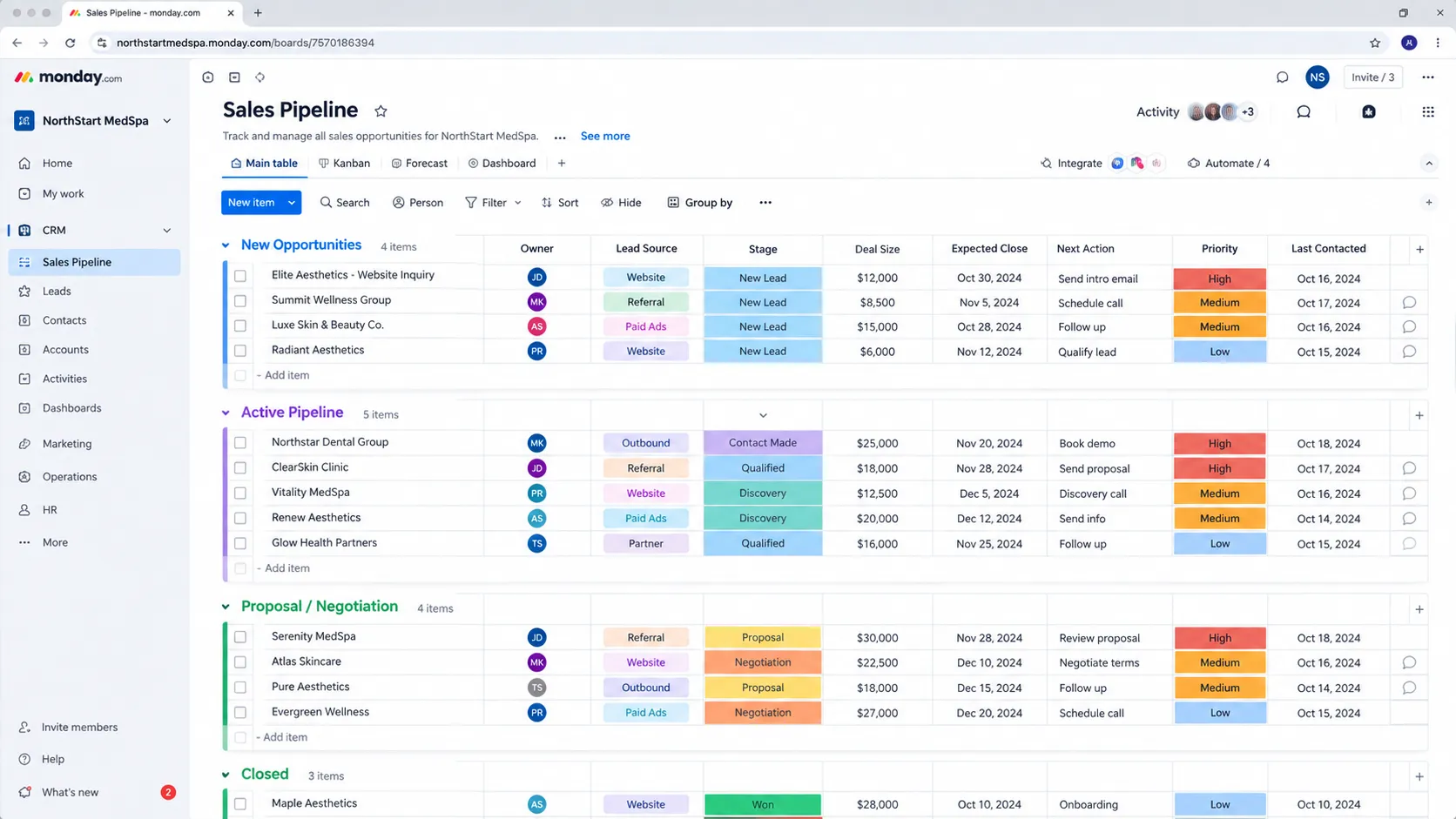
A CRM and delivery system built on monday.com — not a repurposed board.
aibrevo builds monday.com out for ops-led teams running sales, client onboarding and project delivery side by side: connected boards across departments, automations that hand work off between teams, and dashboards that give leadership one view instead of three disconnected tools. Projects typically run 2–8 weeks.
Who this is for
Teams already running monday.com for work management who want sales, onboarding and delivery to share one system — not just a sales pipeline bolted onto a project board.
What we implement in monday.com CRM
Cross-team board architecture
Sales, onboarding, delivery and support boards connected so a deal handoff actually moves data, not just a status — with a clear decision on which board owns which fields to avoid duplicate sources of truth.
Automations & handoffs
Cross-board automations that create the onboarding item, assign the delivery owner and notify the right team the moment a deal closes, built to update existing items rather than create duplicates on every status change.
Dashboards for ops and leadership
Rollups across sales, delivery and resourcing so leadership sees pipeline and capacity in one place, using a deliberately small number of mirrored fields per board rather than pulling in everything available.
Forms & intake
Client-facing and internal forms that route straight into the right board without manual re-entry, with guest/client access configured so external users never see internal boards.
Migration
Import and structuring of existing sales and project data from a spreadsheet, CRM or PM tool, mapped to the new board architecture rather than dropped in as a flat list.
Handover
Documentation and training so your ops team can extend boards and automations without breaking the handoffs — including a naming convention so future automations don't collide with the ones built during the project.
Permissions & guest access
Board and item-level permissions configured so sales, delivery and external guests each see only what they need, without every internal user defaulting to full visibility across every department's boards.
Workload & resourcing views
Resource-allocation views layered on top of the delivery boards so capacity planning is visible alongside the pipeline, instead of tracked separately in a spreadsheet that never quite matches what's actually in monday.
Email & activities sync
Two-way email and calendar sync with contact and deal boards so communication history attaches to the right item automatically, plus a decision on whether activity logging runs through monday's own tools or a connected inbox integration.
Quotes, contracts and invoicing handoff
The step between a won deal and a billable project mapped explicitly, whether that means a connected quoting tool, a document-generation automation or a handoff to an accounting system, so revenue data doesn't get re-typed between boards and finance.
Board templates and governance
A set of approved board templates, naming conventions and an owner for each board, so new projects start from a tested structure rather than a copy of whichever board someone happened to duplicate last, which is how inconsistency multiplies.
A typical monday.com CRM project timeline
Phase proportions are typical, not a guarantee — actual timing depends on data volume, integration count and how much of the data model is custom.
- Week 1
- Discovery mapping how sales, onboarding and delivery currently hand work off to each other — usually the most revealing part of the project, since the gaps are almost always manual re-entry between disconnected boards.
- Weeks 2–4
- The bulk of a typical 2–8 week project — connected board architecture, cross-board automations for handoffs, and forms/intake routing, built alongside migration of existing sales and project data into the new structure.
- Weeks 5–6
- Dashboard build for ops and leadership rollups, guest and permission-access configuration and testing, and integration with lead-source or email tools outside monday.
- Weeks 7–8
- Staged rollout department by department rather than all at once, training for the ops team to extend boards and automations themselves, and go-live. Smaller, single-team builds land closer to 2 weeks; a full cross-team system with a migration behind it runs the full 8.
Common monday.com CRM projects
- Sales-to-delivery handoff build for a services business
- Client onboarding workflow connected to the sales pipeline
- Cross-team dashboard for sales, delivery and resourcing
- Migration from a standalone CRM or PM tool into monday
- Restructuring a DIY monday setup that outgrew its design
Where monday.com CRM projects go wrong
Building the sales board in isolation from delivery
A CRM board gets built with no connection to the boards where onboarding and project work actually happen, so a closed deal still means someone manually re-typing the account into another board.
Mirror-column overload
Boards get connected with mirror columns pulling in a dozen fields each, and every board becomes slow and confusing instead of clearer — most teams need three or four mirrored fields, not all of them.
Automations that create duplicate items instead of updating one
A poorly scoped automation fires on every status change and creates a new item each time instead of updating the existing one, quietly multiplying the board until reporting is unusable.
Ignoring seat-block and plan-wide pricing when scaling access
monday sells seats in fixed blocks and a tier upgrade applies to every seat on the account, not just the new CRM users — adding a handful of sales users can trigger a plan-wide cost jump nobody budgeted for if it isn't planned ahead of time.
Hitting automation and integration action limits mid-rollout
Each plan tier caps automation and integration actions per month, and a cross-board CRM with automated handoffs between sales, onboarding and delivery can burn through that allowance faster than a single-board setup ever would — usually discovered when automations start silently failing.
Using status columns as the only source of truth
Status labels get renamed or reordered by whoever owns a board, and automations keyed to the old label text quietly stop firing. Automations and dashboards should depend on stable column IDs and a documented status vocabulary, not on labels anyone can edit on a whim.
Giving every user board-owner permissions
Because it's easier than thinking about roles, everyone can edit column structure, and within weeks columns are deleted, renamed and retyped, breaking mirrors and dashboards that depended on them. Structure changes should be limited to a small set of owners, with everyone else editing items only.
Treating the CRM board as finished at launch
Teams configure the pipeline once and never revisit it, so stages, automations and dashboards drift from the real process. A lightweight quarterly review of what's used, what's ignored and what's broken keeps a monday CRM aligned with how sales and delivery actually operate.
What does monday.com CRM implementation cost?
monday CRM is sold by the seat with a 3-seat minimum and seat blocks that step up in multiples of 5, and 2026 pricing guides report that monthly billing runs roughly 18% higher than annual and that list prices across tiers rose on 10 February 2026, so verify current per-seat figures on monday.com's pricing page before budgeting. Above 50 seats, and especially above 200, pricing moves into custom quotes, and some guides report negotiated rates of roughly $20–$30 per seat per month at that scale. Because monday CRM is priced separately from Work OS, teams that also run delivery on monday should confirm which products and bundles they need. Partner implementation runs roughly $1.5k for a small build to $10k+ for a heavily customized, cross-team deployment. We quote per project after a 30-minute call.
Certified across the platforms we implement
- salesforceCertified engineers
- HubSpotCertified engineers
- Dynamics 365Certified engineers
- ZohoCertified engineers
- PipedriveCertified engineers
- monday.comCertified engineers
- AirtableCertified engineers
- GoHighLevelCertified engineers
Our engineers hold certifications on all eight platforms we deliver. We work as an independent implementation firm — no reselling, no white-label, no offshore hand-off.More about the team →
Certifications, and what they actually mean
monday.com runs a partner program with product-training tiers, but there's no widely recognized proctored technical certification the way Salesforce or Microsoft has — the tiers largely reflect a partner's sales volume with monday.com, not an individually verified skill level. For this platform, the more useful evidence is whether a builder has designed genuine cross-board architecture (connected boards with deliberate mirror-column limits, automations that update items instead of duplicating them) versus someone who's only ever built single, isolated boards. Ask to see an example of a sales-to-delivery handoff they've built and how they avoided mirror-column overload — that tells you more about capability than any partner-tier badge. Also ask how they think about the boundary between monday CRM and monday's work-management products, because that's where scoping errors hide: a builder who treats them as the same thing will over-buy seats, while one who treats them as unrelated will miss the connected handoff that makes the setup worthwhile. Ask what happens to automations when a column type changes, how they document board dependencies, and how they'd hand the system to an ops team with no developer on staff. Specific, unglamorous answers signal experience; a demo of a polished dashboard does not.
How to tell if your monday.com setup needs a rebuild vs. a fix
A cluttered monday.com account rarely needs a full teardown. These signals separate a targeted fix from a genuine restructure.
Signal it's a fix: one automation creates a duplicate occasionally
An automation misfiring under a specific edge case is a targeted trigger-condition fix, not evidence the whole board architecture is wrong.
Signal it's a rebuild: the sales board has no connection to delivery boards at all
If a deal closing still means someone manually re-typing the account into a separate onboarding or delivery board, that's a structural gap — building real cross-board connections and automations is the fix, not a quick patch.
Signal it's a fix: one dashboard widget shows a stale number
An isolated stale rollup is usually a mirror-column refresh or filter fix, addressable without restructuring the boards feeding it.
Signal it's a rebuild: boards are overloaded with a dozen mirror columns each
Mirror-column overload making every board slow and confusing needs a genuine trim-and-redesign of what data is actually mirrored where, not a one-off cleanup.
Signal it's a fix: a guest or external user has the wrong access to one board
An isolated permission mistake is a quick board-level access fix.
Signal it's a rebuild: the account was built by multiple people over time with no naming convention
Sprawling, inconsistently-named boards and automations built by different people without a shared convention over time usually need a genuine reorganization to become maintainable again.
Signal it's a fix: a status label was renamed and an automation stopped
An automation keyed to a renamed label is a quick repair, ideally followed by documenting the status vocabulary so the same rename doesn't break something else next month.
Signal it's a rebuild: everyone can edit column structure and mirrors keep breaking
If structure is editable by anyone and dashboards regularly break as columns are renamed or retyped, the fix is a permission redesign plus a cleanup of dependent mirrors and automations, not another one-off repair.
How monday.com CRM compares
Read more about monday.com CRM
monday.com CRM implementation — FAQs
Can monday.com handle sales and delivery in one system?
Yes, if the boards are built to hand off to each other deliberately — connected columns, automations and shared dashboards — rather than as separate boards that happen to sit in the same account.
Can you fix a monday setup we built ourselves?
Yes. Restructuring a DIY build that got tangled — fixing connections, mirrors and automations that fire wrong — is a common project.
How is this different from just using monday for project management?
Most teams already use monday for delivery. We add the sales and onboarding layer and connect it, so a deal closing actually triggers the project starting instead of a manual handoff.
How does it integrate with our other tools?
Through native integrations and the monday API, connected to email, forms, lead sources and marketing tools.
Does it work well for client-facing onboarding, not just internal use?
Yes — with forms and guest/client access set up correctly, clients can submit intake information or track onboarding status without seeing internal boards.
What does a typical monday.com project look like week by week?
The first week maps how sales, onboarding and delivery currently hand off work; the middle of a 2–8 week project builds the connected board architecture and automations; the final stretch is dashboard build, guest-access testing and a staged rollout department by department.
How does aibrevo scope a monday.com project differently than a generic quote?
Whether the project is a single sales board or a genuine cross-team system connecting sales, onboarding and delivery is the single biggest cost driver — more than seat count — so we scope from that architecture question first, not from a per-seat template.
What's included in post-launch support?
A post-launch window to tune automations once real usage reveals edge cases — a handoff that fires too early, a mirror column that needs adjusting — plus training for your ops team to extend the system themselves. Retained support is available beyond that.
Can monday.com connect to the CRM-specific tools we already use, like lead-capture forms or email marketing?
Yes, through native integrations and the monday API — most lead-source, form and email-marketing tools connect without custom development, and anything more specific is scoped as its own integration line item.
How do you avoid a plan-wide price jump when we add CRM users?
We scope seat needs and plan tier explicitly against seat-block pricing before build starts, and flag if a tier upgrade would apply account-wide rather than just to the new CRM users — that's a licensing decision worth making deliberately, not discovering on the next invoice.
We already use monday.com for project management — do we really need a partner for the CRM layer?
If the goal is just a standalone sales board with no connection to delivery, self-setup can work. Where a partner adds real value is designing the cross-board automations so a closed deal actually triggers delivery work — that handoff logic is where most DIY monday CRM builds fall short.
Can you fix a monday.com setup that's grown organically and become hard to navigate?
Yes — restructuring boards, trimming mirror-column overload, and fixing automations that create duplicates instead of updating existing items is a common project, usually without needing to discard the underlying data.
Why choose a specialized build over monday.com's own templates?
Templates are a reasonable starting point for a single board, but they're not built to connect sales, onboarding and delivery for your specific handoff process — that connective work, plus dashboard design for what your leadership actually reviews, is where a custom build earns its cost over a template.
How long does it take to build a connected sales-to-delivery system on monday.com?
A single-team build often lands in about two weeks, while a cross-team system connecting sales, onboarding and delivery, with a migration behind it, commonly runs six to eight weeks. The main driver is how many handoffs need automating and how much existing data must be restructured, not the number of boards.
What is monday CRM's seat minimum and how does seat-block pricing work?
monday CRM requires a minimum of 3 seats, and pricing steps up in blocks of 5 beyond that, per 2026 pricing guides. Adding a single user can push you into the next block. We plan seat counts against those blocks before build, so growth doesn't produce a surprise mid-year jump.
Did monday.com raise its prices in 2026?
Some 2026 pricing guides report that list prices increased across tiers on 10 February 2026. Because figures differ between sources and products, we recommend confirming current per-seat pricing on monday.com's own pricing page and getting a written quote before committing, especially if you're comparing CRM against Work OS bundles.
How do we connect monday.com to our accounting or invoicing tool?
Through native integrations, the monday API or an automation platform, depending on volume and reliability needs. The important design step is deciding which system owns invoice and payment status, then pushing only the fields the other system needs, so finance and delivery never end up editing the same number in two places.
Will monday.com scale if our sales team grows quickly?
It scales in seats and boards well, but automation and integration action limits, dashboard performance across large boards and per-plan features can become constraints. We design with those ceilings in mind and flag early if the trajectory points toward a dedicated CRM instead of another round of custom board work.
Other platforms we implement
Scope your monday.com CRM project
A 30-minute call with an engineer. You leave with a written read on your current setup and a clear recommendation — whether or not you hire us.
Book a 30-min call