
 By Alpit Patel and the aibrevo team · September 14, 2026 · 16 min read
Is monday.com a Real CRM? An Honest Assessment
Is monday.com a real CRM or just a project board with a sales label? A pragmatic look at what monday Sales CRM does well and where it falls short.
Key takeaways
- monday.com is a genuine CRM for the right team, but sales-specific mechanics like deal stages and pipeline reporting have to be deliberately built on top of its board architecture — they aren't native the way they are in Salesforce, HubSpot or Pipedrive.
- The real value of monday.com as a CRM isn't the sales board by itself — it's connecting sales, onboarding and delivery boards so a closed deal automatically triggers the next team's work instead of someone re-typing the account into a separate tool.
- Mirror-column overload is the most common way monday.com CRM builds fail in practice — boards pull in a dozen mirrored fields each and become slow and confusing instead of clearer; most teams only need three or four mirrored fields per board.
- A mid-market monday.com CRM build connecting sales, onboarding and delivery typically runs $3.5k-$8k and takes 2-8 weeks, with the wider industry range spanning $1.5k for a small build to $10k+ for a heavily customized cross-team deployment.
- monday.com is the right call for ops-led teams already living in it for delivery or project work who want sales and onboarding to share that same system — a pure sales-first team with no cross-team workflow to protect is usually better served by a dedicated CRM.
- Automations that create a new item on every status change instead of updating the existing one are a quiet but common failure mode — they multiply board volume until reporting stops being usable.
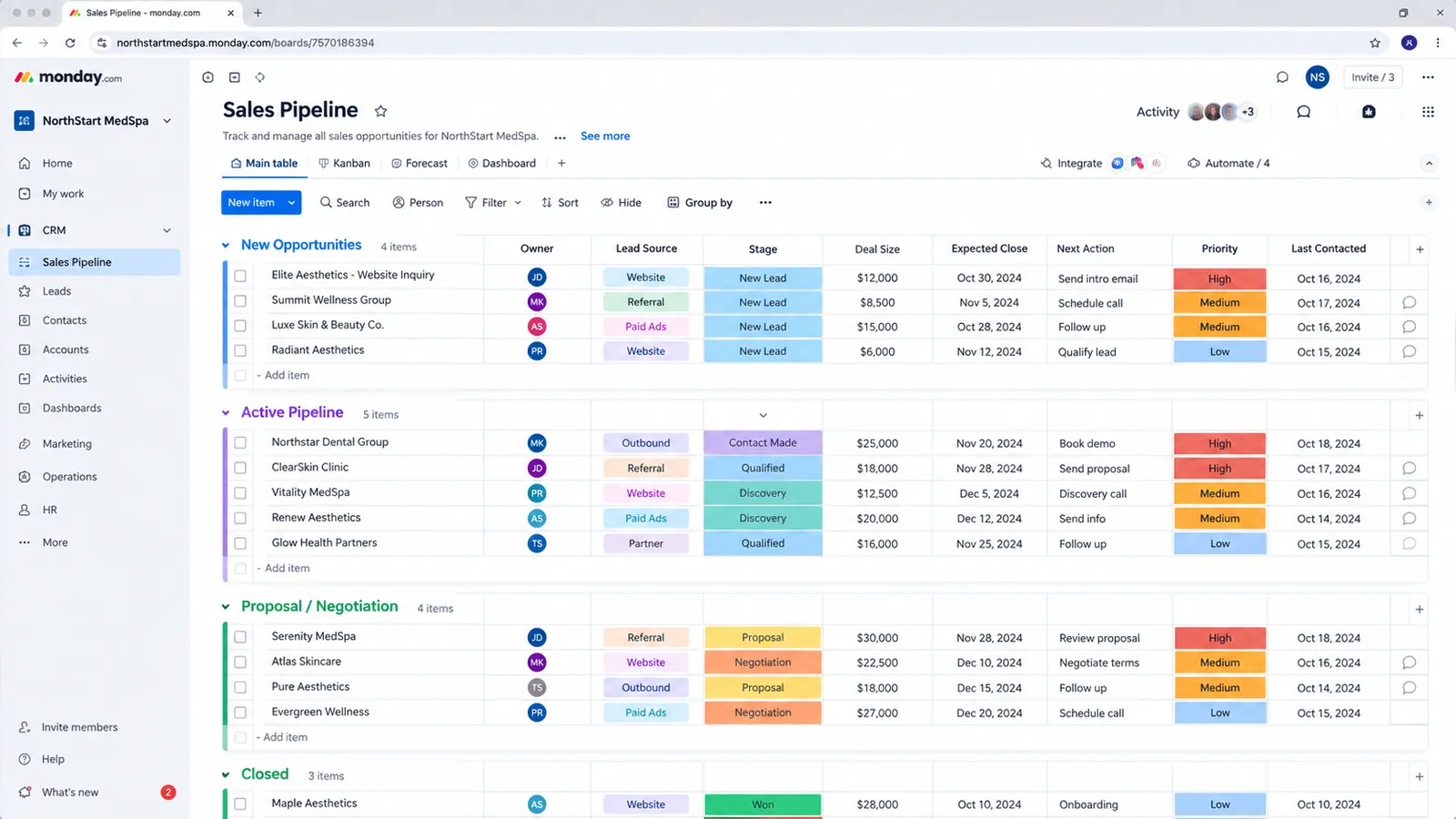
monday.com is a real CRM, but only once someone builds it into one. The underlying board-and-item architecture is flexible enough to model contacts, companies, deals and pipelines, and monday Sales CRM gives that a head start with pre-built templates. What it isn’t is a dedicated sales tool that arrives with pipeline reporting and forecasting already wired up the way Salesforce, HubSpot or Pipedrive do — those pieces have to be deliberately configured, and how well that configuration goes determines whether monday.com ends up feeling like a real CRM or a project board wearing a CRM’s name.
What monday.com genuinely does well as a CRM
The strongest argument for monday.com as a CRM has nothing to do with deal stages. It’s cross-team board architecture: sales, onboarding and delivery can live as connected boards in one system, with a closed deal automatically triggering the next team’s work instead of someone manually re-entering the account into a separate onboarding or project tool.
That matters more than it sounds. In a typical dedicated-CRM setup, a closed-won deal in Salesforce or HubSpot has to be handed off to a project management tool, an onboarding checklist system, or a spreadsheet someone maintains by hand. Someone copies the account details across, someone forgets a field, and the sales team’s record of the customer drifts out of sync with the delivery team’s record within a few weeks. monday.com’s automation model lets a status change on the sales board create or update an item on the onboarding board automatically, carrying the relevant fields with it — no re-entry, no drift, one system of record instead of three.
This is also why monday.com tends to fit ops-led teams particularly well. If a business already runs its delivery, onboarding or project work through monday.com, adding sales as a connected board means sales gets to share infrastructure the rest of the company already knows how to use, rather than introducing a fourth tool that only sales touches. aibrevo builds this specific pattern for ops-led teams between roughly 10 and 100 users — connected boards across sales, onboarding and delivery, cross-team automations, and dashboards that give leadership one view instead of three disconnected tools.
The other genuine strength is flexibility. Dedicated CRMs generally assume a fairly standard sales-to-close motion, and customizing them past that assumption often means custom objects, developer time, or a platform ceiling you eventually hit. monday.com’s board model doesn’t have that ceiling in the same way — it can represent almost any process a team can describe in columns and statuses, which is valuable for a business whose sales motion doesn’t look like the textbook version.
| Capability | Dedicated CRM (Salesforce, HubSpot, Pipedrive) | monday.com |
|---|---|---|
| Deal stages | Native | Built as a status column |
| Pipeline reporting | Native | Built as a dashboard |
| Lead scoring | Native or native add-on | Manual build via formulas or automations |
| Forecasting | Native | Built via mirrored deal-value columns and formulas |
| Cross-team automation (sales → delivery) | Requires a separate PM tool integration | Native, board-to-board |
| Project/delivery board integration | Requires a separate PM tool integration | Native, same platform |
Where monday.com falls short of a dedicated CRM
Set against Salesforce, HubSpot or Pipedrive, monday.com’s honest weakness is that sales-specific mechanics aren’t native. Deal stages, pipeline reporting, win-rate tracking and forecasting all exist in a dedicated CRM the moment it’s provisioned. In monday.com, even with the monday Sales CRM template as a starting point, these need to be deliberately configured: stages defined as a status column, pipeline value calculated through formulas or mirrored deal-value columns, and reporting built as dashboards rather than pulled from a purpose-built reporting engine.
That gap isn’t fatal, but it’s real, and it shows up most clearly in two failure modes.
The first is building the sales board in isolation from delivery. It’s the most common mistake teams make with monday.com as a CRM: a sales board gets built, deal stages get configured, everything looks like a working CRM — and then a deal closes, and someone still manually re-types the account into a separate onboarding or delivery board because the boards were never actually connected. At that point, the sales board is functioning as an isolated deal tracker, not a CRM in the sense that matters for the business. The actual value of monday.com as a CRM comes from connecting these boards, not from the sales board existing on its own — skip that step and monday.com stops being meaningfully different from a spreadsheet with colored labels.
The second is mirror-column overload. Once boards are connected, it’s tempting to mirror every field that’s technically available: every contact detail, every custom field, every status from the linked board. In practice, boards set up this way end up with a dozen or more mirrored columns each, and every board becomes slower to load and harder to scan instead of clearer. Most teams need three or four mirrored fields per board, the ones a rep or project manager actually references daily, not the full set of everything that could theoretically be pulled in.
A related version of the same problem shows up in automations rather than columns: automations configured to create a brand-new item on every status change, instead of updating the existing one, quietly multiply the board’s item count over time until reporting becomes unusable. It looks like activity; it’s actually noise that has to be cleaned up before dashboards mean anything again. The monday.com automation recipes guide covers exactly this failure mode, plus which handoff automations are actually worth building between sales, onboarding and delivery boards, in more depth than fits here. Anyone weighing how to choose a CRM more broadly should treat this kind of configuration risk as part of the real cost of a platform, not an afterthought that shows up after go-live.
SMB implementation cost ranges for monday.com and the three CRMs it’s most often compared against sit closer together than the feature-list debate suggests, which is worth seeing before assuming a dedicated CRM is automatically the pricier or cheaper option:
Is monday CRM the same product as the monday.com work management platform?
No, and this confusion causes more failed evaluations than almost anything else on this list. monday.com sells monday CRM as a distinct product from monday Work Management, with its own pricing tiers (Basic, Standard, Pro, Ultimate) and its own free trial — even though both run on the same underlying board-and-item platform and look nearly identical in a screenshot. A team that already pays for monday.com Work Management to run projects doesn’t automatically get CRM features; those live behind a separate subscription, billed per seat, on top of whatever Work Management plan is already in place. On G2, this split shows up in the review data too: monday CRM carries roughly a 4.6-out-of-5 rating across a little over 1,100 CRM-specific reviews, distinct from the broader monday.com Work Management product’s review base, which is far larger because it’s the older, more widely adopted product.
Why this matters practically: a company evaluating “monday.com as a CRM” based on a Work Management trial is evaluating the wrong product. The CRM template adds contact and company objects, deal-stage automations, and activity-tracking fields that don’t exist by default on a generic Work Management board. It’s possible to hand-build CRM-like functionality on a Work Management board without ever touching the CRM product — plenty of the ops-led builds described above do exactly that, using generic boards rather than the CRM template — but anyone comparing monday.com to Salesforce or HubSpot on features should know which of the two monday products they’re actually looking at, since the pricing, the templates and the starting feature set are genuinely different between them. The side-by-side feature and price table is in monday CRM vs monday work management.
What does monday CRM actually cost per seat, and where do people get surprised?
As of 2026, monday CRM’s published tiers are Basic at $12/seat/month, Standard at $17/seat/month, and Pro at $28/seat/month, all billed annually with a three-seat minimum and five-seat pricing blocks above that (monday.com pricing page, 2026). Monthly billing runs meaningfully higher — roughly $18, $25 and $41 per seat at the same tiers — which is worth knowing before assuming the annual number is what a monthly invoice will show. Two things surprise teams who haven’t budgeted for monday.com specifically before:
First, the seat-block structure means a headcount just over a block boundary gets billed for the next full block. A six-person sales team on CRM Standard isn’t buying six seats — the five-seat block structure rounds up to ten, so that team pays for four seats it isn’t using. This is common across the seat-block CRM category, not unique to monday.com, but it catches teams who budget off the advertised per-seat number without checking how their actual headcount lands against the block sizes.
Second, monday CRM and monday Work Management are billed separately, as covered above, so a team that wants both sales CRM functionality and project/delivery boards under one roof is often paying for two subscriptions rather than one — which changes the total-cost comparison against a single-subscription dedicated CRM. The full breakdown of tiers, seat-block math and what typically pushes a team from Basic to Standard or Pro lives in the monday.com CRM pricing guide; it’s worth reading before a seat count gets locked into an annual contract.
How do you migrate existing contacts and deals into monday.com?
Migration into monday.com is a data-mapping problem before it’s a technical one. The platform accepts CSV/Excel imports natively, and monday.com’s own import wizard can map spreadsheet columns to board columns during setup, which handles a clean, well-structured source file reasonably well. Where migrations actually run into trouble is the same place they run into trouble on any CRM: messy source data. Duplicate contacts under slightly different names, deal values stored as text instead of numbers, dates in inconsistent formats, and free-text “stage” fields that don’t map cleanly to a defined status column all need cleanup before import, not after — importing dirty data into a fresh board just moves the mess into a new system with a nicer interface.
For a migration coming out of a dedicated CRM like Salesforce, HubSpot or Pipedrive, the bigger question usually isn’t the contact and deal records themselves — it’s what happens to historical activity: logged calls, emails, notes and stage-change history. monday.com doesn’t have a native “activity timeline” import path the way some dedicated CRMs do when migrating between similar platforms; activity history typically gets summarized into an update or a custom field rather than imported as a structured, filterable log. Coming from Airtable instead, the hard part is linked records; see how to move from Airtable to monday.com. That’s a real limitation worth flagging to a sales team before migration, particularly for reps who rely on scrolling through a contact’s full interaction history during a call. The CRM migration guide covers de-duplication, field mapping and cutover sequencing in more depth than fits here, and applies whether the destination is monday.com or a dedicated CRM.
What integrations does monday.com support for a sales team?
monday.com connects to the usual sales-stack tools — Gmail and Outlook for email sync, Google Calendar and Outlook Calendar for scheduling, Slack for notifications, Zoom for meeting links, and Mailchimp or similar tools for marketing sync — through native integrations in the platform’s integration center, plus a broader library of Zapier and Make connections for anything not natively supported. For teams with development resources, monday.com’s API (GraphQL-based) supports custom integrations beyond what the native library covers, which matters for a business with an internal tool, a proprietary billing system, or an industry-specific platform that needs a two-way sync.
The practical gap compared to a dedicated CRM shows up in depth, not availability. A native Salesforce or HubSpot email integration typically logs full email threads automatically against a contact record with minimal configuration. monday.com’s version works, but it’s frequently a lighter sync — new email or a manually triggered log rather than full automatic thread capture — and teams that live by very complete email-activity history sometimes find themselves supplementing it with an update log or a dedicated integration app from monday.com’s marketplace. Before assuming an integration works exactly the way it does in a previous CRM, it’s worth testing the specific integration against the specific workflow a team relies on daily, not just confirming the integration exists in the list.
What does a realistic first 30 days building monday.com as a CRM look like?
A build that avoids the failure modes above tends to follow a similar sequence regardless of team size. Week one is data model and board structure: defining deal stages as a status column, deciding what a “contact” and “company” item look like, and mapping which fields actually need to exist versus which ones sound useful but nobody will maintain. Week two is connecting boards — sales to onboarding, onboarding to delivery — and building the handful of automations that move a record from one board to the next on a status change, scoped from the start to update existing items rather than create new ones. Week three is import and cleanup: migrating existing contacts and deals, de-duplicating, and testing the automations against real records rather than sample data. Week four is dashboards and rollout: building the two or three reporting views leadership actually checks weekly, training the team on the new process, and running the first full sales-to-delivery handoff live to confirm the automation chain works end to end before calling it done.
Skipping straight to week four — building dashboards before the underlying board connections and automations are solid — is a common shortcut that produces a good-looking demo and a system that breaks the first time a real deal moves through it. The monday.com automation recipes guide has the specific automation configurations worth building in weeks two and three, including the update-not-duplicate pattern that keeps board volume sane past the first few months of real use.
monday.com vs a dedicated CRM: who each one actually fits
The honest verdict depends on what a team is protecting, not on which platform has more features on a comparison page.
monday.com is the right call for ops-led teams that already live in it for delivery or project work and want sales and onboarding to share that same system. If a business runs client onboarding checklists, project timelines, or delivery workflows through monday.com today, extending it to cover sales means the whole customer lifecycle, from first contact through delivery, lives in one connected system instead of a CRM plus a separate project tool with data duplicated between them. That’s a genuinely strong position, and it’s the scenario where monday.com outperforms a dedicated CRM rather than merely approximating one.
A dedicated CRM is the better call for a pure sales-first team that doesn’t need cross-team board flexibility. If the business’s real need is pipeline tracking, forecasting and sales reporting, with no meaningful onboarding or delivery workflow to connect it to, then paying for monday.com’s flexibility buys nothing — the team ends up building, by hand, features that Salesforce, HubSpot or Pipedrive include natively, on a platform designed for connecting boards it will never actually need to connect. That team should look at monday.com CRM pricing alongside a dedicated CRM’s cost before assuming monday.com is automatically the cheaper option; if the cross-team board architecture goes unused, the calculus shifts.
For the teams in between, the deciding question is usually simple: does a closed deal need to trigger work in another part of the business today, in this same system? If yes, monday.com’s architecture is doing real work. If no, that flexibility is a cost without a corresponding benefit, and it’s worth checking current plans and per-seat pricing against what a dedicated CRM would actually cost to run the same sales process.
Setting monday.com up as a CRM that actually holds up
Getting monday.com to function as a real CRM, not a project board with a sales label, comes down to a short list of decisions made early. None of the three below are difficult individually, but skipping any one of them is exactly how a promising monday.com CRM build turns into the slow, cluttered version that gives the whole approach a bad name.
Connect boards from the start
Link the sales board to onboarding and delivery during the initial build rather than bolting the connection on later, so a closed deal triggers the next team's work automatically instead of someone re-typing the account by hand.
The cross-team link is the whole reason to pick monday.comKeep mirrored fields to a handful
Limit each board to the three or four mirrored fields a rep or project manager actually checks daily, rather than pulling in every field that's technically available to mirror.
Avoids the mirror-column overload that slows every board downBuild automations that update, not duplicate
Scope automations to update an existing item on a status change rather than creating a new one each time, so board volume stays accurate instead of quietly multiplying until reporting breaks.
Keeps dashboards trustworthy months after launchThe teams that get real value out of monday.com as a CRM are the ones that treat the cross-team connection as the point, not an optional add-on to a sales board that could have been built anywhere. Get that right, and the comparison to a dedicated CRM stops being about which one has more native sales features and starts being about which one actually reflects how the business works end to end.
What breaks after go-live, and how do you troubleshoot it?
Most post-launch problems on a monday.com CRM build fall into three categories, and all three are diagnosable without a developer. The first is a broken handoff automation: a deal marks “closed won” but nothing shows up on the onboarding board. Nine times out of ten this is a status-value mismatch — the automation was built to trigger off a specific status label, and someone renamed that status label during a later board edit without updating the automation that depended on it. The fix is checking the automation’s trigger condition against the current status column options, not assuming the automation itself is broken.
The second is a mirrored field showing stale or blank data. Mirror columns pull live from the source board, so if a mirrored field looks wrong, the actual problem is almost always on the source board — a renamed column, a deleted item, or a changed column type that broke the mirror connection rather than the CRM. Rebuilding the mirror connection after any structural change to the source board (renaming a column, changing its type) is a five-minute fix that a lot of teams don’t realize they need until a dashboard has been quietly wrong for a few weeks.
The third is dashboard numbers that don’t match what a rep believes is true. This is usually the duplicate-item problem described above — an automation set to create rather than update has been running for months, and the dashboard is now counting the same deal two or three times under slightly different item names. The fix isn’t a dashboard setting; it’s auditing the underlying automations for create-vs-update logic and merging or archiving the duplicate items before the count is trustworthy again. None of these are exotic failures — they’re the predictable result of monday.com’s flexibility, and a team that knows to look for them first usually resolves a “broken CRM” complaint in under an hour instead of escalating it into a rebuild.