
 By Alpit Patel and the aibrevo team · September 16, 2026 · 16 min read
GoHighLevel for Real Estate: Lead Automation That Actually Gets Followed Up On
How real estate agents and teams use GoHighLevel to speed up lead response, nurture by lead temperature, automate listing alerts, and route leads across a brokerage.
Key takeaways
- Speed-to-lead is the highest-value automation in real estate. A workflow that texts a new portal or website lead within minutes, before a human even opens the notification, is what keeps that lead from cooling off or calling the next agent on the results page.
- Nurture sequences need to branch by lead temperature rather than run every inquiry through one generic drip, because an agent working an 18-month browser and an agent working a this-week buyer need entirely different cadences and messaging.
- Listing alerts only earn their keep when they're built on saved search criteria tied to a contact record, not a one-time blast, so a buyer keeps getting matched inventory automatically as new listings hit the market.
- Open house follow-up should fire the same day, not the next morning, because a visitor who toured three homes on a Saturday will have moved on emotionally by Monday if nobody re-engaged them within hours.
- Transaction-milestone messages (offer accepted, inspection scheduled, closing date confirmed) reduce the manual check-in calls a coordinator would otherwise make and give clients a paper trail of where the deal stands.
- Brokerages generating leads centrally need round-robin or rules-based routing with visible response-time tracking, since a lead that sits unassigned for hours is one of the most common reasons a brokerage-wide CRM rollout fails to get adopted by agents.
Real estate lead automation in GoHighLevel comes down to one structural fact: leads go cold fast, and most brokerages lose them not on a bad pitch but on a slow or missed response. A CRM built for this workload needs to text a new portal lead within minutes, branch nurture sequences by how ready that lead actually is to transact, keep listing alerts running automatically against saved search criteria, follow up on open house visitors the same day, communicate transaction milestones without manual chasing, and route leads to the right agent with visibility into who’s actually responding. Get those six pieces right and a brokerage’s CRM starts working the way a good ISA team would, minus the payroll. Skip any one of them and leads quietly leak out the bottom of the funnel.
Speed-to-lead
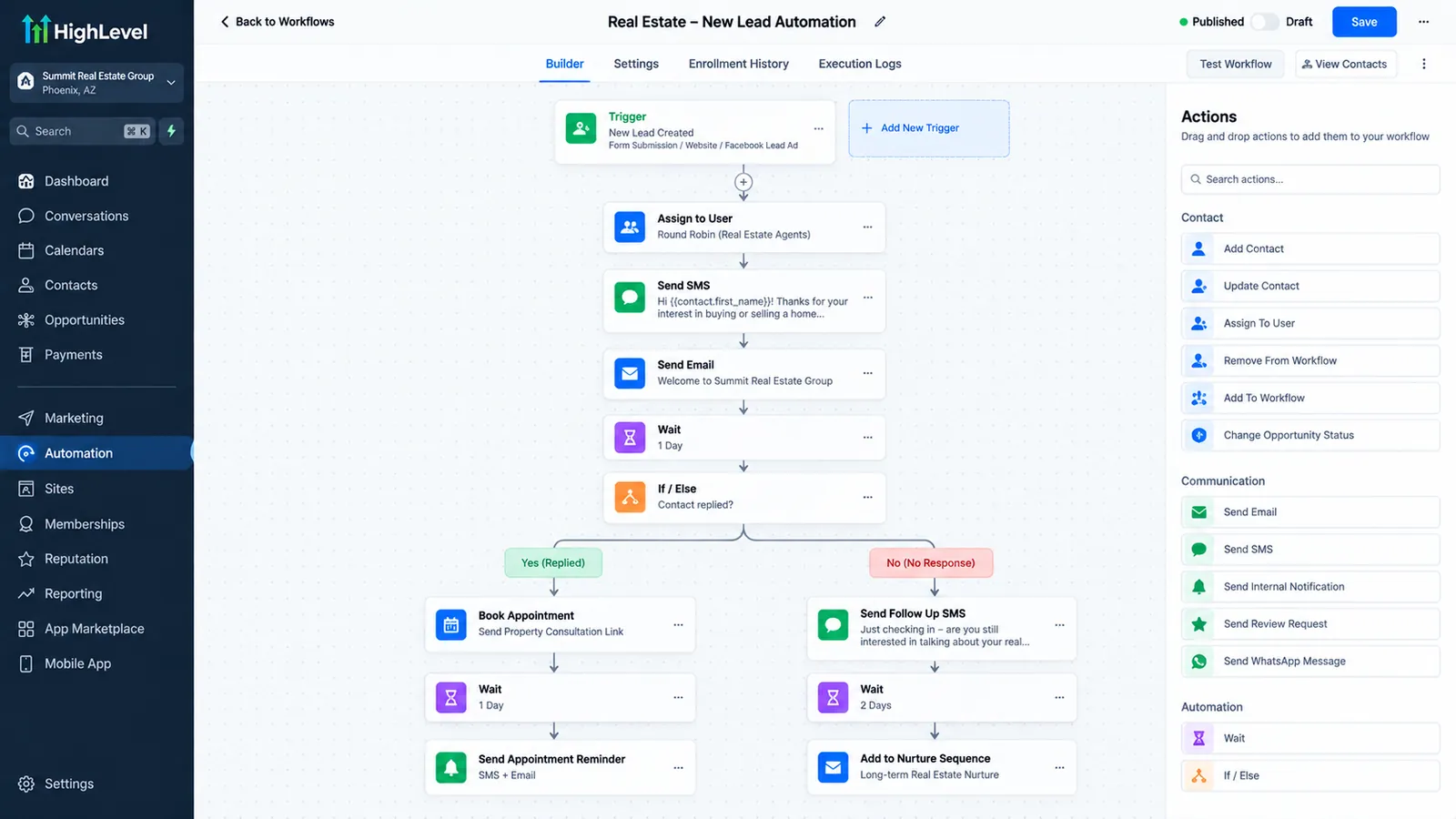
A form submission, missed call, or portal lead triggers an automated text and email within a minute or two, plus a task for the assigned agent to make a real call.
Wins the lead before a competitor calls backTemperature-based nurture
A temperature tag set at intake (hot, warm, cold) branches each lead into a different cadence, from hourly call attempts to a monthly market-update sequence, and re-scores automatically based on behavior.
Matches outreach frequency to a buyer's real timelineListing alert automation
An MLS/IDX feed connected to each buyer's saved search criteria triggers an automatic alert with property details and a showing link the moment a new listing or price change matches.
Keeps buyers matched without an agent remembering to check inventoryOpen house follow-up
A sign-in sheet or digital form triggers a same-day thank-you message with a listing link and a low-pressure next step, followed by a second check-in a few days later.
Catches interest before it fades by the next morningTransaction-milestone communication
A pipeline stage change (inspection scheduled, financing cleared, closing date confirmed) triggers a status message to buyer, seller, and relevant parties, with a timestamped record of each step.
Replaces manual coordinator check-ins with an automatic paper trailAgent and team routing
Round-robin or rules-based assignment routes each new lead to an agent, with a response-time layer that flags or reassigns any lead left untouched past a set window.
Stops leads sitting unassigned inside a shared brokerage CRMSpeed-to-lead: winning the first few minutes
A lead who just filled out a form on Zillow, a brokerage website, or a Facebook ad is very likely doing the same thing on two or three other sites at the same moment. The agent who responds first has a real, measurable edge, not because of anything special in the pitch, but because most leads simply go with whoever answers first and follows up consistently. Waiting until the next business day, or even a few hours, hands that advantage to someone else.
The fix is a workflow, not a habit. When a form submits, a missed call comes in, or a portal lead lands in the CRM, a workflow should fire an automated text and email within a minute or two acknowledging the inquiry, and simultaneously create a task or alert for the assigned agent to make a real call. The automated message buys time; it doesn’t replace the human follow-up. A common pattern is a two-step sequence: an instant text confirming receipt and offering to schedule a call, then a second message roughly fifteen to twenty minutes later if the lead hasn’t responded, nudging again with a specific, easy next step like a link to book a showing.
Missed calls deserve the same treatment as form fills. A buyer who calls a listing’s marketing number and doesn’t reach anyone is a warm lead that most offices let go cold by default. A workflow that triggers an automatic text the moment a call goes unanswered, something as simple as “Sorry we missed your call about [address], here’s a link to grab a time that works,” recovers leads that would otherwise just try the next agent’s number.
What the current data actually says about lead response times
Most posts about real estate lead response time still lead with a stat that sounds shocking and is also thirteen years out of date: “917 minutes average response time, 48% of leads never followed up.” That number is real, but it traces back to a 2013 WAV Group and Weichert secret-shopper study of 384 inquiries across 11 states. A lot of current content attributes the same figure to an “Inman 2025 survey,” and that particular survey doesn’t appear to exist as a distinct, checkable source. The stat just kept getting recycled with a fresher-sounding citation attached to it.
The current data tells a similar story with different numbers. Mike DelPrete’s 2024 secret-shopper study, published through Inman and cross-confirmed by HousingWire, sent more than 100 shoppers to 30 brokerages and found that 47% of online property inquiries received no human response at all, 42% of open-house attendees were never even asked for their contact information, and 62% of shoppers got no follow-up of any kind. Average response time came in at 8 hours and 17 minutes, but the median was just 39 minutes. That gap means a smaller number of very slow, or entirely non-responsive, agents are dragging the average up while most responsive agents actually move faster than the headline number suggests.
Set the 2013 WAV Group/Weichert non-response rate (48%) next to DelPrete’s 2024 figure (47%) and the industry-wide non-response problem has barely moved in over a decade, despite CRM adoption growing substantially in that window. Tooling alone was never the bottleneck. Workflow design is.
That gap between the mean and the median is the actual argument for automation. It’s not that every agent is bad at follow-up. It’s that a workflow closes the gap for the agents and teams who’d otherwise land in that slow tail. Worth flagging one more claim while we’re on the topic: a widely repeated line, “78% of homebuyers work with the first agent who responds, per NAR’s 2025 report,” shows up across a lot of GoHighLevel and real estate CRM content. Checked directly against NAR’s actual published research, that statistic doesn’t appear anywhere in it. Any real estate lead-response stat with a suspiciously round percentage and a vague citation is worth checking against the primary source before repeating it.
Sources: WAV Group and Weichert, 2013 secret-shopper study (384 inquiries, 11 states); Mike DelPrete, 2024 secret-shopper study published via Inman, cross-confirmed by HousingWire.
Nurture sequences built around lead temperature, not one generic drip
Not every lead is ready to transact this month, and treating an 18-month browser the same as a pre-approved buyer wastes both the lead’s patience and the agent’s time. GoHighLevel workflows should branch based on a temperature tag set at intake, usually from a quick qualifying question (timeline, financing status, whether they’re actively touring) baked into the lead form or the first automated conversation.
A hot lead, someone actively touring and ready to make an offer, needs a short, high-touch sequence: a call attempt within the hour, a same-day follow-up text, and messaging focused on scheduling showings rather than general market content. A warm lead, someone six months out who’s still narrowing down neighborhoods, does better on a steadier weekly or biweekly cadence mixing listing suggestions with light check-ins. A cold or long-term lead, someone a year or more from being ready, is best served by a monthly market-update sequence that keeps the agent’s name in front of them without pushing for a call they’re not ready to take.
The tag isn’t fixed once assigned. A workflow should re-evaluate temperature based on behavior, moving a cold lead into the warm sequence automatically if they click through to a listing multiple times or reply to a market update asking a specific question. That behavioral re-scoring is what keeps a long nurture list from becoming a set of names nobody ever revisits.
Listing alert automation tied to saved search criteria
A listing alert that actually helps a buyer isn’t a manual email an agent remembers to send when they think of it. It’s a workflow that runs continuously against a buyer’s saved search criteria, price range, area, bedroom count, and any specific must-haves, and fires automatically whenever a new listing or price change matches.
This requires two things working together: an MLS/IDX feed connected into GoHighLevel so listing data actually flows into the CRM, and saved search criteria stored on each buyer’s contact record rather than living only in the agent’s memory or a separate portal login. Once that’s in place, a new matching listing triggers an alert with the property details and a direct link to schedule a showing, and the agent gets a parallel notification so they can follow up personally on anything that looks like a strong match.
The failure mode here is a listing alert that fires once at intake and never runs again. Buyer criteria shift as they see more inventory, and a workflow that doesn’t get revisited or updated when a buyer’s preferences change will keep sending listings that no longer fit, which trains buyers to ignore the alerts entirely.
Open house follow-up that happens the same day
Open house traffic is one of the most wasted lead sources in residential real estate, mostly because follow-up happens the next morning instead of the same afternoon. Interest peaks right after a visitor walks through a home; by the next day, they’ve likely toured two or three others and the specific impression of that property has already started to fade.
A same-day workflow triggered by a sign-in sheet or digital open house form should send a short thank-you message within an hour or two, with a link back to the listing and a low-pressure next step, scheduling a private showing, or requesting the disclosure packet. A second message two to three days later can check in more directly: are they still considering this home, or comparing it against others. For visitors who don’t respond to either message, folding them into the standard temperature-based nurture sequence keeps them from disappearing entirely without turning into repeated, ignored outreach.
Brokerages running multiple open houses on the same weekend benefit from tagging each lead by the specific property they visited, since that tag is what lets the workflow reference the right listing automatically instead of sending a generic template that doesn’t match what the person actually saw.
Transaction-milestone communication once a deal is under contract
Lead nurture and active-transaction management are different jobs and deserve different pipeline stages. Once a buyer or seller is under contract, the communication need shifts from persuasion to status updates: has the inspection been scheduled, is financing on track, what’s the actual closing date. Clients under contract check their phone for these updates more than almost any other point in the relationship, and a coordinator manually texting every party at every step doesn’t scale past a handful of active files.
A workflow tied to pipeline stage changes solves this cleanly. When a deal moves to “inspection scheduled,” a message goes out confirming the date and what to expect. When financing clears, a message confirms that milestone and previews what’s next. When a closing date gets confirmed, a message with the specifics goes to buyer, seller, and any relevant party on that side of the transaction. Because these are pipeline-stage triggers rather than manually typed check-ins, moving the deal card also produces a timestamped communication record, which is useful if a client later asks when something happened.
This is also where transaction coordinators get the most direct time back. Instead of remembering to text five different clients at five different moments, the coordinator moves a card, and the notification handles itself.
Agent and team routing for brokerages
A brokerage generating leads centrally, through a main website, a lead-gen ad account, or a portal subscription shared across agents, needs a reliable way to get each lead to the right person fast, and a way to see when that isn’t happening. Round-robin routing rotates new leads evenly across a defined agent pool, which works well when agents are roughly interchangeable on the leads coming in. Rules-based routing assigns by criteria like zip code, price tier, or lead source, which fits better when agents specialize by area or price point.
Either method needs a visible response-time layer on top of it, because assignment alone doesn’t guarantee follow-up. A workflow that flags a lead as unassigned or untouched past a set window, say thirty minutes for a hot inbound lead, and alerts a team lead or auto-reassigns it, catches the exact failure mode that kills adoption of a brokerage-wide CRM: leads sitting untouched because the assigned agent was busy, on vacation, or simply missed the notification. Brokerages that skip this step often find agents quietly reverting to their own spreadsheets within a few months, because the shared system didn’t actually solve the handoff problem it was supposed to fix.
For a brokerage weighing whether to build this out internally or bring in outside help to configure routing, temperature-based nurture, and listing alerts correctly the first time, the GoHighLevel for Real Estate solutions page covers what a fully scoped implementation includes for teams and brokerages of different sizes.
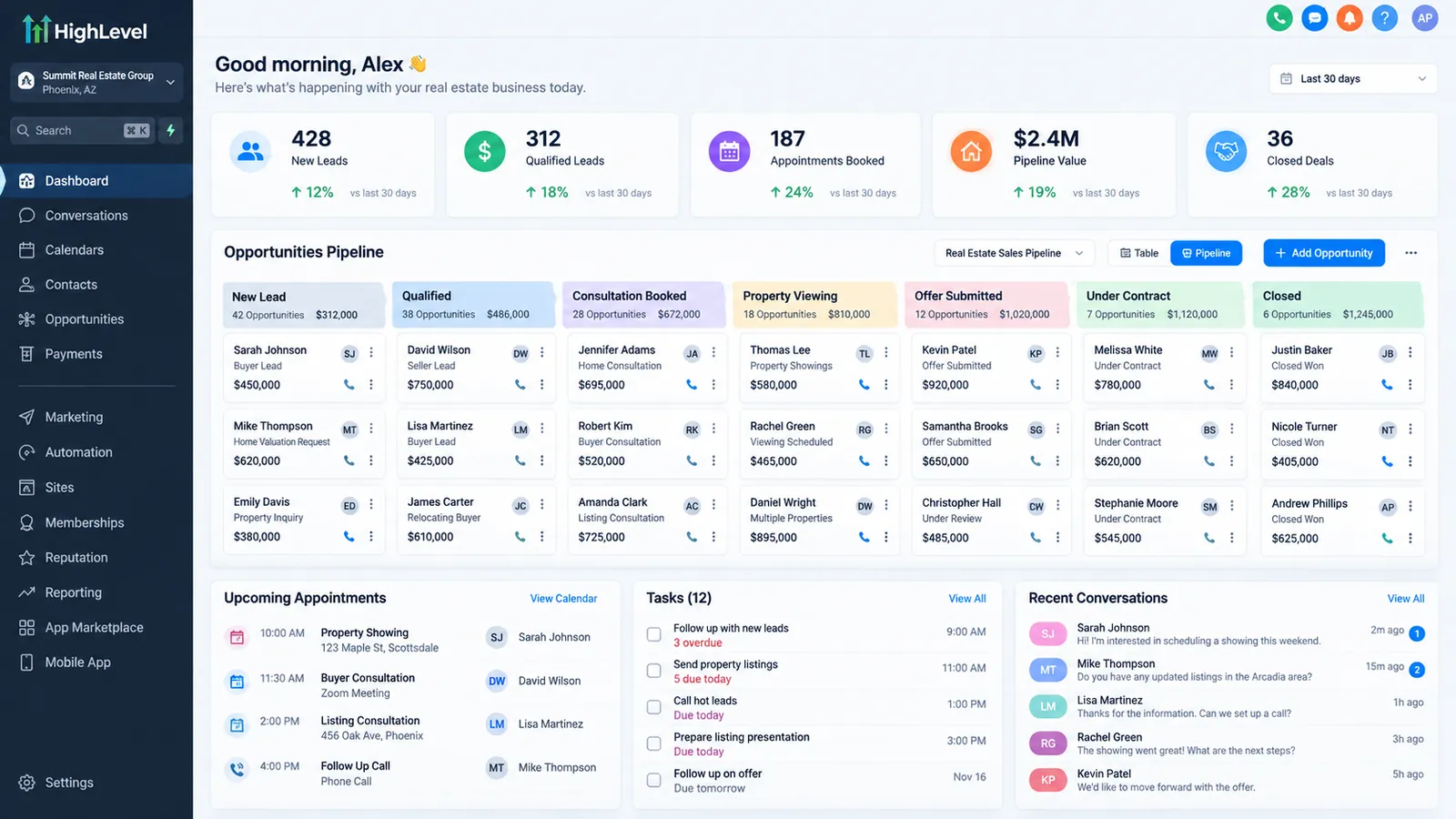 *Illustrative example of a GoHighLevel pipeline view for real estate, built with a fictional brokerage name and invented sample data for demonstration purposes only, not an actual client account.*
Where the best real estate leads actually come from
According to the National Association of Realtors’ 2025 REALTORS Technology Survey, fielded in September 2025 from 1,241 responses out of 49,233 members surveyed, social media accounts for 39% of the leads members ranked as their highest-quality source, well ahead of anything else on the list. CRM systems rank second at 23%, ahead of local MLS feeds (17%), a brokerage’s own website (13%), digital ads (12%), and an agent’s personal website (12%).
CRM sitting at #2, ahead of both website types and just behind social media, is a useful data point for anyone deciding whether lead automation is worth the setup time. The leads themselves might originate on Zillow, a Facebook ad, or an open house sign-in sheet, but the system that catches them, tags them, and gets them a fast response is doing measurable work toward how well that lead actually converts.
It’s also worth being honest about where GoHighLevel sits next to real-estate-specific CRMs. Follow Up Boss, for instance, is built specifically for real estate teams and ships MLS/IDX integration and transaction pipelines that GoHighLevel has to be configured to replicate. Its published pricing runs from $69 per user a month on the Grow plan up through enterprise tiers with per-user add-ons. kvCORE (rebranded to BoldTrail since 2024) and LionDesk are the other two names that come up most often in this comparison, though neither has clear, current, vendor-confirmed pricing available: kvCORE/BoldTrail’s pricing is sales-gated, and LionDesk’s future as a standalone product is genuinely uncertain since parent company Lone Wolf has been folding it into a broader “Lone Wolf Relationships” product. None of the three are apples-to-apples competitors to a general-purpose platform like GoHighLevel. They’re vertical tools that ship real estate features out of the box, and that tradeoff, more configuration work against a lower base price, is worth weighing honestly before choosing either path.
Rebuild or fix: reading the signals
Not every real estate CRM problem calls for starting over. A missed-call follow-up that isn’t firing is usually a single workflow trigger that needs correcting. A listing alert sending stale matches is a saved-search field that needs updating on the affected contacts. Those are quick, contained fixes.
A structural gap looks different: no speed-to-lead automation at all, nurture sequences that treat every lead identically regardless of timeline, or a brokerage with no visibility into whether leads are actually getting worked once assigned. Those require real setup work, not a tweak to an existing workflow, and they’re the gaps worth addressing before adding more lead sources on top of a system that isn’t following up on the leads it already has.
A quick way to tell which situation you’re in: pull the last thirty leads that came through the main source (portal, website, ad account) and check two things by hand, how long after submission the first outbound contact went out, and whether that contact happened at all. If the delay is inconsistent, sometimes minutes, sometimes hours, with no clear pattern, that’s a workflow trigger worth auditing, not a system rebuild. If a meaningful share of those thirty leads show no outbound contact logged whatsoever, the problem isn’t a broken trigger on one workflow, it’s that no workflow is covering that lead source in the first place, and that’s the structural gap worth fixing before anything else on this list.
What separates teams that actually convert these leads
The brokerages and agents getting real value out of GoHighLevel aren’t the ones with the most automations. They’re the ones whose automations cover the moments that actually determine whether a lead converts: the first few minutes after inquiry, the ongoing nurture that matches a buyer’s real timeline, listing alerts that stay matched to changing criteria, the same-day follow-up after an open house, transaction-milestone updates once a deal is under contract, and the handoff to the right agent with someone actually watching whether it happened. Build those six pieces correctly and the CRM starts doing the work an ISA team would otherwise need to do by hand. If you’re scoping this for your own team or brokerage, the GoHighLevel implementation services page covers what a properly structured build includes, and the GoHighLevel agency setup guide is a useful companion if you’re also managing this across multiple client or franchise accounts.
To have speed-to-lead and follow-up workflows built for you, see GoHighLevel setup for real estate.