
 By Alpit Patel and the aibrevo team · September 16, 2026 · 15 min read
GoHighLevel Email Deliverability: Fixing SPF, DKIM and DMARC
Why GoHighLevel emails land in spam instead of the inbox, what SPF, DKIM and DMARC actually check, and how to set up the DNS records that fix it.
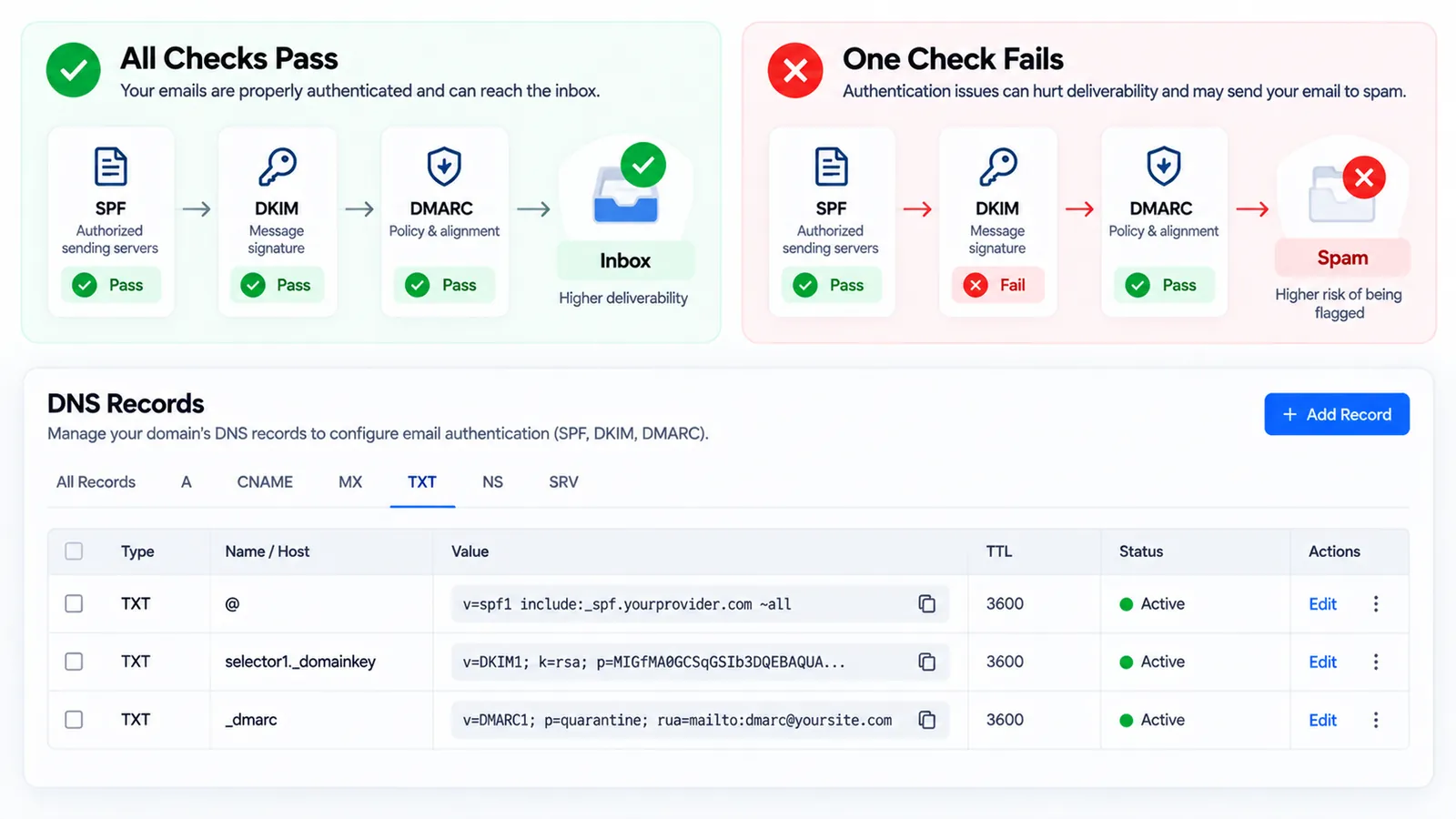
Key takeaways
- SPF, DKIM and DMARC are three separate checks, and a sending domain needs all three configured correctly. Passing two out of three is often enough to trigger spam placement, not full delivery.
- SPF authorizes which mail servers are allowed to send on a domain's behalf; DKIM cryptographically signs the message so it can't be altered in transit; DMARC tells receiving mail servers what to do when SPF or DKIM fails, and without a DMARC record, inbox providers apply their own default (often stricter) judgment.
- The single most common deliverability mistake when connecting a custom sending domain to GoHighLevel is publishing the DNS records once and never verifying propagation or re-checking them after a domain registrar or DNS host migration.
- A domain with a DMARC policy of p=reject or p=quarantine set by IT for security reasons, without GoHighLevel's sending infrastructure fully authorized under SPF and DKIM first, will see GoHighLevel-sent email silently fail rather than land anywhere visible.
- Authentication passing is necessary but not sufficient. List hygiene (removing hard bounces and unengaged contacts) and avoiding spam-trigger content still affect inbox placement independently of whether SPF/DKIM/DMARC pass.
- A newly connected sending domain benefits from a gradual volume ramp-up rather than sending full campaign volume on day one, since inbox providers weigh sending reputation that a domain hasn't yet built.
- Google requires senders of 5,000+ messages/day to Gmail addresses to authenticate with SPF, DKIM and DMARC, support one-click unsubscribe, and keep spam complaint rates under 0.30% in Postmaster Tools, per Google's own bulk sender guidelines, in effect since February 2024.
- Only 8.9% of domains with a DMARC record (159,691 of 1.8 million analyzed) actually enforce it at the strongest level (p=reject with reporting) as of early 2026, per EasyDMARC's 2026 DMARC Adoption & Enforcement Report; most domains publish a record but never turn on real protection.
An email that never reaches the inbox doesn’t fail loudly. There’s no bounce, no error message, no obvious signal that anything went wrong: the message simply lands in spam, or gets silently dropped, while the sender assumes it was delivered. In GoHighLevel, this almost always traces back to one thing, the sending domain isn’t properly authenticated with SPF, DKIM and DMARC.
What do SPF, DKIM and DMARC actually check?
Inbox providers (Gmail, Outlook, Yahoo, and the rest) need a way to verify that an email claiming to be from a domain is actually authorized to send on that domain’s behalf. Three separate DNS-based checks handle this, and they check different things.
SPF (Sender Policy Framework) is a DNS TXT record listing which mail servers are allowed to send email for a domain. When a message arrives claiming to be from yourbusiness.com, the receiving server checks whether the server that actually sent it is on the domain’s approved SPF list. If GoHighLevel’s sending infrastructure isn’t included in that list, mail sent through GoHighLevel fails this check.
DKIM (DomainKeys Identified Mail) adds a cryptographic signature to each outgoing message, generated using a private key that matches a public key published in the domain’s DNS. The receiving server verifies the signature against that public key, confirming the message wasn’t altered in transit and genuinely came from a server holding the matching private key, in this case, GoHighLevel’s sending servers, once properly configured.
DMARC (Domain-based Message Authentication, Reporting and Conformance) is a policy layer sitting on top of both, standardized in IETF RFC 7489. It tells receiving servers what to do when a message fails SPF or DKIM: reject it outright, quarantine it (which usually means the spam folder), or take no explicit action while optionally requesting a report on failures. Without a DMARC record at all, receiving servers apply their own default handling, which varies by provider and has gotten stricter as inbox providers tighten spam filtering. Both Google’s and Microsoft’s bulk-sender guidelines now treat all three as baseline requirements, not optional hardening, and Google’s policy specifically requires a DMARC record for anyone sending more than 5,000 messages a day to Gmail addresses.
Why does this break specifically when connecting GoHighLevel?
A domain can have had working email for years, through Google Workspace, Microsoft 365, or a previous marketing platform, and still fail authentication the moment GoHighLevel starts sending on its behalf, because SPF, DKIM and DMARC authorize specific sending sources, not a domain in general. Adding a new sending platform means that platform’s servers need to be explicitly added to the domain’s SPF record and its own DKIM key published, or its outgoing mail will fail authentication even though the domain’s existing email (from Workspace or 365) continues working fine.
This is the single most common cause of “GoHighLevel emails go to spam but our regular company email doesn’t.” The regular email is authenticated under the existing setup; the newly connected GoHighLevel sending domain isn’t yet. It also explains why an SPF record can look “complete” to someone who isn’t checking closely: an SPF record only allows one include: mechanism chain per domain in practice before hitting the 10-lookup limit that RFC 7208 places on SPF evaluation, so a domain that’s already stacked several tools into its SPF record (Workspace, a help desk, a previous marketing platform) can silently fail to add GoHighLevel’s include if that lookup limit is reached, even though the record looks syntactically fine.
Why does an SPF record silently break past 10 DNS lookups?
An SPF record fails with a “permerror” once evaluating it requires more than 10 DNS lookups, a hard ceiling written into RFC 7208, and when that happens the entire SPF check fails, not just the mechanism that pushed it over the limit. Every include: mechanism in an SPF record (one for Google Workspace, one for a help desk, one for a previous email platform) typically costs at least one lookup, and some, like include:_spf.google.com, expand into several nested lookups on their own once you count what they in turn include.
A domain that’s been through several tools over the years accumulates these includes quietly, and nobody notices the record is close to the limit until adding GoHighLevel’s own include pushes it over. The result looks confusing from the outside: the SPF record is syntactically valid, GoHighLevel’s mechanism is correctly present in the text, and the check still fails. The fix is to audit the full record with an SPF lookup counter before adding a new include, and remove any mechanism for a platform that’s no longer actually sending mail from the domain, since stale includes are the most common source of wasted lookups. Flattening the record (resolving nested includes into static IP ranges) is a more advanced fix some DNS providers support directly, but it needs to be re-flattened whenever the underlying sender’s IP ranges change, so it trades one maintenance problem for another rather than eliminating it.
What do Gmail and Yahoo’s 2026 bulk sender rules mean for a GoHighLevel-connected domain?
Gmail and Yahoo require any sender pushing 5,000 or more messages a day to a given provider to authenticate with SPF, DKIM and DMARC, support one-click unsubscribe, and keep spam complaint rates under 0.30% in Google Postmaster Tools, requirements that took effect February 1, 2024 and apply regardless of which platform sends the mail. Google’s own bulk sender guidelines spell out the exact thresholds: SPF and DKIM configured, a DMARC record present (a policy of p=none satisfies the requirement, though it offers no actual protection), and a spam rate that stays under 0.10% for comfortable margin, since 0.30% is where enforcement kicks in hard.
These thresholds matter for a GoHighLevel-connected domain in two ways. First, they’re the floor, not a ceiling reserved for enterprise senders: a small agency running review-request or appointment-reminder campaigns across several client sub-accounts can cross 5,000 messages a day faster than expected once a handful of active clients are counted together. Second, the enforcement has gotten less forgiving over time: reporting from deliverability vendors including Red Sift and PowerDMARC describes Google shifting non-compliant bulk mail from spam placement toward outright rejection through late 2025 and into 2026, meaning a domain that’s out of compliance risks messages bouncing rather than just landing in spam. That specific enforcement-tightening detail is reported consistently across deliverability vendors rather than confirmed in a single dated Google announcement, so it’s worth treating as a trend to plan around rather than a fixed date to hit.
The practical implication for GoHighLevel senders: treat SPF, DKIM and DMARC as mandatory infrastructure the moment a custom sending domain is connected, not as an optional hardening step to revisit later once volume grows. Retrofitting authentication onto a domain that’s already sending is more disruptive than setting it up before the first campaign goes out.
The gap in that chart is the same gap that trips up GoHighLevel senders specifically. A domain with a DMARC record at p=none looks “done” to whoever set it up, but p=none requests reporting without blocking or quarantining anything that fails, so it provides visibility, not protection. Moving to real enforcement (p=quarantine, then p=reject) only works safely once every legitimate sending source under the domain, GoHighLevel included, is confirmed passing SPF and DKIM in the DMARC reports first. Jump straight to p=reject without that confirmation step, and any sender that isn’t cleanly authenticated, including a newly connected GoHighLevel domain, gets its mail rejected outright rather than just flagged.
How do you read a DMARC report to catch a GoHighLevel authentication gap early?
A DMARC record with an rua= tag tells receiving mail servers where to send aggregate reports, and those reports are the fastest way to catch a GoHighLevel sending domain that’s failing authentication before it turns into a full deliverability problem. Each report (sent roughly daily, in XML format, by providers like Google and Microsoft) lists every server that sent mail claiming to be from the domain during that period, along with whether each one passed SPF and DKIM.
Reading raw DMARC XML by hand isn’t realistic at any real volume, so most teams use a free or low-cost DMARC report viewer that parses the XML into a readable table: source IP, sending volume, pass/fail status per mechanism. The specific thing to check for a GoHighLevel setup is whether GoHighLevel’s sending IPs show up as a distinct, passing source in that table. If they show up as failing, or don’t show up at all despite GoHighLevel actively sending on the domain’s behalf, that’s the direct signal that the SPF include or DKIM key for GoHighLevel isn’t correctly published or hasn’t propagated yet, often faster to catch this way than waiting for a human to notice mail landing in spam.
How do you set it up correctly?
GoHighLevel’s domain and email settings provide the exact SPF, DKIM and DMARC record values to publish for a connected sending domain. The actual publishing happens at the domain’s DNS host, wherever the domain is registered or its nameservers point, not inside GoHighLevel itself. In practice:
- Locate the DNS records GoHighLevel specifies for the sending domain (typically a set of TXT and CNAME records).
- Log into the domain’s DNS host (registrar or DNS management provider) and add each record exactly as specified.
- Wait for DNS propagation, which can take anywhere from a few minutes to 24-48 hours depending on the DNS host and existing TTL settings.
- Verify the records are live using GoHighLevel’s own verification indicator or an independent DNS lookup tool, checking that the live records match what was expected.
- Send a low-volume test campaign or transactional email and check inbox placement directly (not just that the send succeeded) before trusting the domain for full campaign volume.
How do you read the failure signals?
All checks pass, mail lands in spam anyway. Authentication passing is necessary but not sufficient for inbox placement. List hygiene (sending to hard-bounced or long-unengaged addresses) and content that trips spam filters (excessive links, spam-trigger phrasing, mismatched sender name and reply-to) still affect placement independently of authentication status.
One check fails, the others pass. This is often enough to trigger spam placement on its own, particularly a DKIM failure, since a failed signature looks more suspicious to filtering systems than a missing-but-not-actively-failing SPF record. Fix whichever specific record is failing rather than assuming the whole setup needs to be redone.
Everything was working, then suddenly wasn’t. Check for a recent DNS host or domain registrar migration first. Moving a domain’s DNS management, or even switching registrars while keeping the same host, sometimes doesn’t carry over custom TXT records automatically. The second most common cause is an IT team tightening the domain’s DMARC policy (often to p=reject or p=quarantine) for general security reasons without confirming every legitimate sending source, GoHighLevel included, is still properly authorized under the stricter policy.
A brand-new domain, fully authenticated, but still low delivery. A domain with no prior sending history hasn’t yet built sending reputation with inbox providers. Starting at lower volume and ramping up over one to two weeks, while watching bounce and complaint rates, tends to produce better long-term placement than sending at full campaign volume from day one.
A typical two-week reputation warm-up curve for a newly authenticated sending domain: start narrow, watch bounce and complaint rates at each step, and only widen volume once those stay low. This is an illustrative pacing pattern, not a fixed schedule; a domain with any sign of rising complaints at a given stage should hold volume steady rather than advance to the next one.
What is BIMI, and is it worth setting up after SPF, DKIM and DMARC?
BIMI (Brand Indicators for Message Identification) displays a verified brand logo next to authenticated emails in supporting inboxes, and it’s worth considering only after DMARC is already enforcing at p=quarantine or p=reject, since BIMI is built as a reward layered on top of strong DMARC, not a replacement for it. Gmail, Yahoo and several other major providers support BIMI display, and setting it up typically requires a DMARC policy at enforcement level plus a Verified Mark Certificate (a paid credential from an authorized certificate authority) for the logo to display consistently across inboxes rather than intermittently.
For a GoHighLevel-connected domain still working through basic SPF, DKIM and DMARC setup, BIMI is a “later” item, not a “now” item. It solves a different problem (brand recognition and marginally higher open rates from a recognizable logo) than the core deliverability problem this guide addresses, and pursuing it before DMARC enforcement is solid is a common ordering mistake: the certificate and DNS record for BIMI do nothing useful until the DMARC policy underneath them is already at enforcement level.
A quick diagnostic checklist before assuming the problem is content or list quality
Before troubleshooting spam-trigger language, sender reputation services, or list segmentation, run through the authentication basics first, since they’re faster to check and responsible for the majority of “GoHighLevel emails aren’t landing” reports.
| Check | How to verify | What it tells you |
|---|---|---|
| SPF record includes GoHighLevel | Independent DNS TXT lookup on the sending domain | Confirms GoHighLevel’s servers are authorized to send |
| SPF stays under 10 DNS lookups | SPF lookup counter tool | Rules out a silent permerror on the whole record |
| DKIM key published and matching | GoHighLevel’s domain settings verification indicator, or a DKIM lookup tool | Confirms message-signing is active and the public key matches |
| DMARC record present | DNS TXT lookup for _dmarc.yourdomain.com |
Confirms a policy exists at all, even if it’s only p=none |
| DMARC alignment | DMARC report viewer, checking GoHighLevel’s source IPs | Confirms GoHighLevel’s sends align with the visible From: domain, not just that SPF/DKIM pass in isolation |
| Recent DNS or registrar migration | Check migration date against when deliverability changed | Rules out (or confirms) the single most common “it worked before” cause |
Working down that list takes a few minutes with the right tools open and rules out the majority of authentication-side causes before spending time on content or list-quality theories that may not be the actual problem.
Who should actually own the DNS work: the agency or the client?
For agencies running GoHighLevel on behalf of clients, deciding who holds DNS access before onboarding starts avoids a delay that shows up on almost every rushed setup. GoHighLevel needs specific records published at the domain’s DNS host, and that host is controlled by whoever manages the client’s domain, sometimes the client directly, sometimes an outside web developer or IT provider the agency has no existing relationship with.
The practical pattern that avoids delay: request DNS access (or a scheduled call with whoever holds it) as part of onboarding, before the account is otherwise ready to send, not after a campaign is already built and waiting to go out. Agencies that leave DNS access as a loose end frequently find themselves blocked for days waiting on a client’s web developer to respond to an email, while the rest of the GoHighLevel build sits finished but unusable for actual sending. Treating DNS record publication as a required, tracked onboarding step, the same way a domain transfer or a payment setup would be tracked, closes that gap before it becomes a delay.
This is also where a documented handoff matters. If the client’s own IT team owns DNS and doesn’t want to hand over registrar-level access, the workable middle ground is providing them the exact records GoHighLevel needs (copy-pasteable TXT and CNAME values, not just “set up SPF for us”) and confirming they’ve been published and propagated before the campaign launch date, rather than assuming it happened because the request was sent.
Does list hygiene interact with authentication, or are they fully separate problems?
They’re separate mechanics but they compound each other, which is why authentication passing perfectly can still coexist with weak inbox placement. SPF, DKIM and DMARC answer one question: is this message actually from who it claims to be from. List hygiene, meaning bounce rates, spam-complaint rates, and how many recipients on a list are actively engaging versus long dormant, answers a different question: does this specific sender’s mail look like something recipients want, independent of whether it’s authenticated.
Inbox providers weigh both. A fully authenticated domain sending to a stale list, addresses that haven’t opened an email in a year, addresses that have quietly gone dead, still produces the engagement signals (low opens, rising unsubscribes, occasional spam complaints) that inbox filtering treats as a sign the mail isn’t wanted, regardless of how clean the SPF and DKIM checks come back. This is precisely why a domain can pass every authentication check in this guide and still see declining placement over time: the DNS side is fixed, but the list itself has degraded.
The practical fix sits outside DNS entirely: regularly removing hard bounces and long-unengaged contacts from active sending lists, segmenting reactivation campaigns separately from core campaign sends rather than blasting a full list at once, and watching complaint rate as a leading indicator rather than waiting for placement to visibly decline first. None of that replaces getting SPF, DKIM and DMARC right, since a domain with broken authentication won’t reliably reach the inbox no matter how clean its list is, but treating authentication as the whole fix while ignoring list quality is how a properly configured domain still underperforms months after setup.
Where should you look first when the inbox stops working?
Deliverability problems in GoHighLevel are rarely a platform bug. They’re almost always a DNS authentication gap between the sending domain and GoHighLevel’s sending infrastructure. Confirming SPF, DKIM and DMARC are correctly published and currently live is the first, fastest diagnostic step before assuming anything deeper (list quality, content, sender reputation) is the cause. Getting this right the first time, as part of a proper account setup rather than an afterthought, is part of what’s covered under GoHighLevel implementation services.